PromptReel Lab · Guides
How to make AI product photos that don't change your product
You've seen it: you ask AI for an ad of your serum bottle and get a beautiful image of a different bottle. The label is gibberish, the cap is the wrong shape, and the glass changed colour. For an art project that's fine. For an ad it's useless, because the customer has to receive the thing in the picture.
Here's the method I use in ChatGPT image generation to keep the product accurate while AI builds everything around it.
1. Start from a real photo, not a description
Shoot your product by a window on a plain surface, label facing the camera, phone at product height. Take five and keep the sharpest. Attach it in ChatGPT before you paste anything.
2. Open with a preservation line
Paste this first:
Use the attached photo as the exact product. Keep its shape, proportions, colours, materials, cap/closure and label text unchanged; do not redraw, restyle or add text to the label. Wherever this prompt describes the product, use the product in the photo instead.
It tells the model which part of the image is fixed and which part it's free to invent.
3. Describe the scene like a photographer
Art words ("stunning", "beautiful") give you art. Camera words give you product photography:
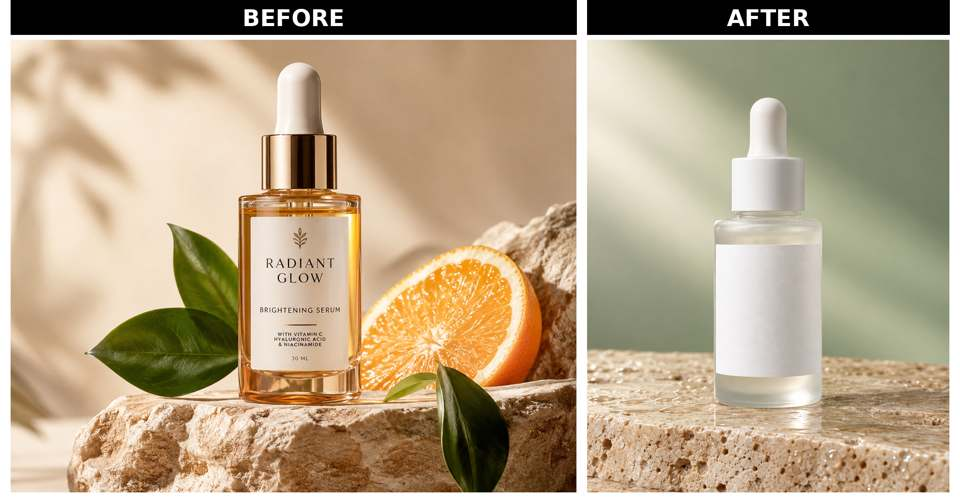
Commercial studio packshot of this product, centred, standing on a wet travertine stone slab, seamless backdrop in soft sage green and warm cream, large softbox key light from the left, white bounce fill on the right, crisp contact shadow, label facing camera and perfectly legible, 85mm lens, f/8, true-to-life colour, no extra objects. Vertical 4:5 ad format.
Here's the difference structure makes. Left is "a photo of a serum bottle ad", right is the prompt above (written for a sample product):
4. Render 2–4 times and check
AI output varies every run. Render a few, keep the best, then compare it with your real product: label text, logo, cap, colour, size. Small text still drifts sometimes. If it does, ask for "no text on the label" and composite your real label in an editor, or crop so the label isn't the focus.
5. Keep text out of the image
Ask for "no text" and "empty space in the top third", then add your headline in Canva. AI lettering still breaks.
What this does and doesn't do
It makes AI a scene-builder around your real product instead of a product inventor. It doesn't guarantee pixel-perfect labels, and it isn't a substitute for checking. Treat every render as a draft until it matches what you ship.
Try it free: the AI Product Ad Prompt Generator builds a photo-first prompt around your product, no login. The full kit (41 before/after recipes, hooks and scripts, and a 7-day workflow) is PromptReel Lab on Whop.
All example images are AI-generated in ChatGPT image generation from text descriptions of sample products. AI output varies between renders. No sales or performance claims.